Two-Factor Authentication vs Two-Step Verification: What Is the Difference and Which One Does Your Business Need?
If you have ever set up account security, you have probably seen both terms: Two-Factor Authentication and Two-Step Verification. They sound almost identical. Many people use them interchangeably. Even major tech companies sometimes confuse them.
But they are not the same thing — and understanding the difference matters if you want to properly protect your business accounts.
By the end of this article, you will know exactly what each term means, how they differ, which one is more secure, and what your business should be using in 2026.
What Is Two-Step Verification?
Two-step verification is a login process that requires you to complete two separate steps before gaining access to an account.
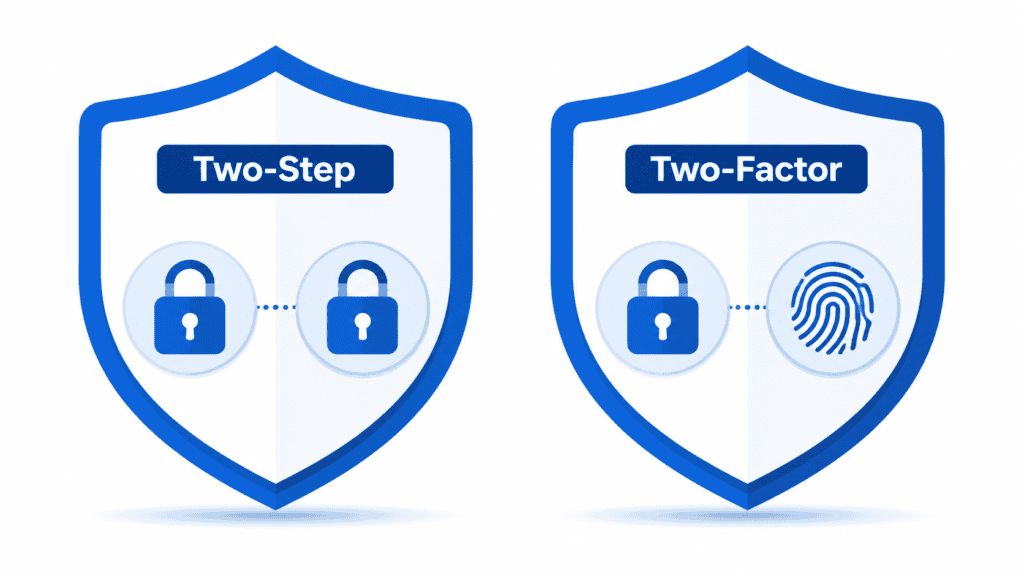
The key word here is steps — not factors. Two-step verification simply means there are two stages to the login process. Both steps can use the same type of authentication.
A common example: you enter your password (step one), then you enter a one-time code sent to your email address (step two). Both steps use something you know. There is only one factor type involved, but two steps.
Another example: you enter your username on one page, then your password on the next. Two steps, but only one factor.
What Is Two-Factor Authentication (2FA)?
Two-factor authentication is a login process that requires two different types of authentication factors. The emphasis here is on factors — specifically, two factors from different categories.
Authentication factors fall into three categories. Something you know such as a password, PIN, or security question. Something you have such as your phone, a hardware key, or an authenticator app. And something you are such as a fingerprint, face scan, or voice recognition.
True two-factor authentication requires factors from at least two of these three categories. A password plus an authenticator app code is genuine 2FA — something you know plus something you have. A fingerprint scan plus a hardware key is also genuine 2FA — something you are plus something you have.
The Key Difference Explained Simply
Here is the clearest way to understand the difference: every two-factor authentication is also two-step, but not every two-step verification is two-factor authentication.
If you need two passwords to log in, that is two-step verification — but not two-factor authentication because both are the same factor type.
If you need a password plus a fingerprint scan, that is both two-step and two-factor — because the factors come from different categories.
Simple rule: Two-factor authentication is more secure because it requires an attacker to compromise two fundamentally different types of security, not just two pieces of the same type.
Why Does This Distinction Matter for Security?
Consider this scenario: your business requires employees to enter a password and then answer a security question. This is two-step verification. But if an attacker phishes your employee and gets their password, they may also research or guess the security question answer. Both are things you know — so compromising one makes compromising the other significantly easier.
Now consider requiring a password plus a one-time code from an authenticator app on the employee’s physical phone. Even if an attacker gets the password, they also need physical access to that specific phone. These are genuinely different factor types, so compromising one does not help the attacker compromise the other.
This is why genuine 2FA provides much stronger protection than simple two-step verification.
Common Examples of Each
Two-Step Verification Examples
Password followed by a security question answer — two steps, one factor type, both things you know.
Username entry on one page then password on the next — technically two steps but still one factor.
Password followed by a second PIN — two steps, same factor type.
True Two-Factor Authentication Examples
Password plus a time-based code from Microsoft Authenticator — something you know plus something you have.
Password plus a push notification approval on your phone — something you know plus something you have.
Password plus a hardware security key like a YubiKey — something you know plus something you have.
Fingerprint scan plus a one-time code — something you are plus something you have.
What About Multi-Factor Authentication (MFA)?
You will also frequently see the term Multi-Factor Authentication or MFA. This is the broadest term and simply means using two or more authentication factors from different categories.
Two-factor authentication is technically a subset of MFA — it is MFA using exactly two factors. Some high-security environments use three factors: something you know, something you have, and something you are.
In everyday business usage, 2FA and MFA are often used interchangeably. When you see either term in a security recommendation, the advice is essentially the same — add a second layer of authentication beyond just a password.
Which One Should Your Business Use?
For most small and mid-sized businesses in 2026, the practical recommendation is true two-factor authentication — specifically a password combined with an authenticator app or hardware security key.
Avoid relying on security questions as your second step — they are a second step but not a second factor, and they provide significantly weaker protection.
SMS text message codes are better than nothing but are considered the weakest form of genuine 2FA because of SIM swapping vulnerabilities. Authenticator apps and hardware keys are significantly more secure.
For most business accounts — Microsoft 365, Google Workspace, banking, cloud services, website admin panel — an authenticator app provides excellent protection and is completely free to implement.
Best Two-Factor Authentication Methods Ranked
- Hardware Security Keys — Most Secure
Physical devices like YubiKey that you plug in or tap to authenticate. Virtually impossible to phish. Best for administrator accounts, financial accounts, and executive email. Cost is 5 to 0 per key.
- Authenticator Apps — Recommended for Most Businesses
Microsoft Authenticator, Google Authenticator, or Authy generate time-based codes that refresh every 30 seconds. Free, secure, works without cell service. This is the best choice for most business accounts and employees.
- Push Notification Approval — Convenient but Watch for Fatigue
Tap Approve on your phone when logging in. Very easy to use but be aware of MFA fatigue attacks where attackers send repeated approval requests hoping you accidentally tap approve.
- SMS Text Codes — Minimum Baseline
A code sent to your phone via text message. Better than no second factor, but vulnerable to SIM swapping attacks. Use an authenticator app instead wherever possible.
- Security Questions — Avoid
Not genuine two-factor authentication. Security questions are a second step but not a second factor. They provide significantly weaker protection and should not be relied upon as your primary second layer of security for business accounts.
How to Enable Proper 2FA for Your Business
For Microsoft 365: Go to admin.microsoft.com, navigate to Users then Active Users, select Multi-factor authentication, enable MFA for all users, and direct your team to install Microsoft Authenticator on their phones.
For Google Workspace: Go to admin.google.com, navigate to Security then 2-Step Verification, enable and enforce enrollment for all users.
For any other account: Look in the security settings for Two-Factor Authentication or Multi-Factor Authentication and follow the setup steps. Always choose an authenticator app over SMS wherever the option is available.
How NetProtechs Helps Arizona Businesses Implement 2FA
Setting up genuine two-factor authentication across an entire organization takes planning and change management to do well. Our team handles the full implementation: choosing the right 2FA method for each account type, deploying authenticator apps, training employees on how to use 2FA correctly, setting up conditional access policies to enforce 2FA, and monitoring for any accounts that bypass or disable it.