
If you’ve ever lost hours of work because your server crashed, or had your entire team sitting idle while waiting for IT support, you already understand the value of reliable managed IT services.
But what exactly are managed IT services — and how do you know if your business needs them?
In this guide, we’ll break down everything you need to know: what managed IT services include, how they work, and why they’ve become the go-to solution for businesses across Arizona that want enterprise-grade IT without the enterprise-sized price tag.
What Are Managed IT Services?
Managed IT services is a model where a third-party company — called a Managed Service Provider, or MSP — takes responsibility for monitoring, managing, and maintaining your business’s IT infrastructure.
Instead of calling someone when something breaks, managed IT is proactive. Your MSP monitors your systems around the clock, identifies problems before they cause downtime, and handles everything from software updates to cybersecurity — all for a predictable monthly fee.
Think of it this way: rather than hiring a plumber every time a pipe bursts, you’d hire a team that checks your plumbing daily, fixes small leaks before they flood your basement, and is on call 24/7 if anything goes wrong. That’s exactly what managed IT does for your technology.
What Does Managed IT Include?
A quality managed IT provider like NetProtechs covers a wide range of services under one flat monthly rate.
24/7 Network Monitoring
Your network is watched around the clock. Any unusual activity, performance dip, or potential failure triggers an alert — and our engineers respond immediately, often before you even notice a problem.
Help Desk Support
When your team has an IT issue — whether it’s a printer that won’t connect, a forgotten password, or a software error — they call our helpdesk and get a real engineer on the line within minutes.
Patch Management and Updates
Outdated software is one of the biggest cybersecurity vulnerabilities. We handle all your operating system updates, security patches, and firmware upgrades automatically — so you’re always protected.
Endpoint Security
Every device your team uses — laptops, desktops, mobile phones — is secured with enterprise-grade antivirus, anti-malware, and threat detection software.
Data Backup and Recovery
Your data is automatically backed up every day. If something goes wrong — ransomware attack, hardware failure, accidental deletion — we can restore your data quickly and get you back online.
Vendor Management
We deal with your internet provider, software vendors, and hardware suppliers on your behalf. One call to us handles everything.
How Much Does Managed IT Cost?
Managed IT services typically cost between $100 and $300 per user per month, depending on the level of service and the size of your business.
Compared to hiring a full-time IT employee — which costs $60,000 to $100,000 per year in salary alone, not counting benefits, training, and equipment — managed IT is significantly more cost-effective.
And unlike a single in-house IT employee, a managed service provider gives you an entire team of certified engineers, available 24/7, with expertise across every area of IT.
Who Needs Managed IT Services?
Managed IT is ideal for businesses that have between 5 and 500 employees, don’t have a dedicated in-house IT team, have experienced IT downtime in the past 12 months, handle sensitive data in healthcare, legal, or financial sectors, are growing quickly and need scalable IT support, or want predictable IT costs with no surprise bills.
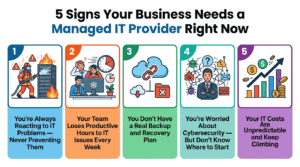
5 Signs Your Business Needs Managed IT Right Now
- You’re Always Reacting to IT Problems
You only call IT when something breaks — instead of preventing problems in the first place. This is the most expensive way to run IT support and leaves your business constantly vulnerable.
- Your Team Wastes Time on IT Issues
Every hour your employees spend troubleshooting technology is an hour they’re not doing their actual job. For a team of 20 people, this adds up to thousands of dollars in lost productivity every week.
- You Don’t Have a Backup Plan
If your server died right now, how long would it take to recover? Where are your backups? When were they last tested? If you can’t answer these questions clearly, your business is at serious risk.
- You’re Worried About Cybersecurity
Small businesses are the #1 target for ransomware and phishing attacks, yet most have minimal protection. If you feel exposed, you probably are.
- Your IT Costs Are Unpredictable
One month you spend nothing, the next month you’re hit with a $5,000 emergency repair bill. Managed IT converts your costs to a flat, predictable monthly fee so you can budget with confidence.
Why Arizona Businesses Choose NetProtechs
At NetProtechs, we’ve been providing managed IT services to businesses across Arizona since 2016. Certified engineers holding Microsoft, Cisco, and CompTIA credentials handle your account. We commit to responding to every issue within 60 minutes. Our flat-rate pricing means one predictable monthly fee with no surprise charges. We’re based in Mesa, AZ and serve businesses across the Phoenix metro area.
Ready to Get Started?
If you’re tired of IT problems slowing your business down, a free IT audit is the best first step. We’ll assess your current infrastructure, identify your biggest vulnerabilities, and give you a clear action plan — with no commitment required.