Introduction
Ask most small business owners if they have a disaster recovery plan, and you’ll get one of two answers: ‘We back up our data’ or ‘We’ve been meaning to work on that.’
Neither is a disaster recovery plan. A backup is a component of disaster recovery. A disaster recovery plan is a documented, tested strategy for how your business continues operating after a major disruption — and it’s one of the most important documents your business can have.
What Is a Disaster Recovery Plan?
A Disaster Recovery Plan (DRP) is a documented set of procedures that enables your business to recover from an IT disaster.
The two most important metrics are RTO (Recovery Time Objective — how quickly do you need to be back online?) and RPO (Recovery Point Objective — how much data can you afford to lose?). These two numbers drive all your technology decisions.
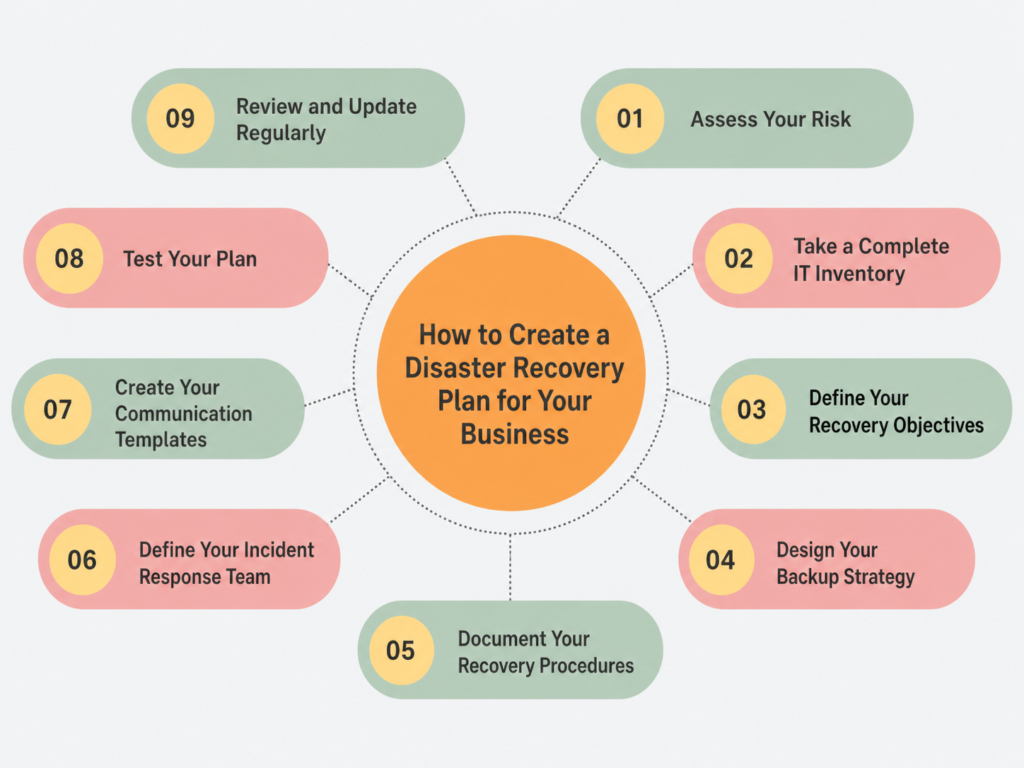
Step 1: Assess Your Risk
For most Arizona businesses, the primary risks are cyberattacks (highest probability), hardware failure (high probability), human error (high probability), power outages (medium probability), and natural disasters (lower probability but higher impact).
For each risk, estimate probability and impact to focus your DR investments.
Step 2: Take a Complete IT Inventory
Document every IT asset: servers and what runs on them, workstations and laptops, network equipment, cloud services, all applications and their dependencies, data storage locations and volumes, and vendor contacts, including your internet provider and IT support.
Step 3: Define Your Recovery Objectives
With your risk assessment and inventory complete, define your RTO and RPO for each critical system. For example, email should be recoverable within 2 hours, file server within 4 hours, and financial software within 4 hours. These objectives drive your technology choices.
Step 4: Design Your Backup Strategy
Use the 3-2-1 rule: 3 copies of your data, 2 different storage media, 1 offsite or cloud copy. For most small businesses: Microsoft 365 files backed up to cloud, file servers backed up nightly to a local appliance and replicated offsite, and databases backed up with transaction log backups every 15-60 minutes for critical systems.
Step 5: Document Your Recovery Procedures
For each major scenario, document: how to detect and confirm the incident, who to notify immediately, how to contain the damage, the restoration sequence, how to restore from backup with exact steps, how to verify the restoration was successful, and how to return to normal operations.
Be specific. Your procedures should be clear enough that someone unfamiliar with your systems could follow them in a crisis.
Step 6: Define Your Incident Response Team
Designate an Incident Commander who makes decisions, a Technical Lead who executes recovery procedures, and a Communications Lead who manages messaging to employees, customers, and vendors. Document primary and backup contacts for each role.
Step 7: Create Your Communication Templates
Prepare templates in advance for employee notifications, customer notifications, and vendor communications. Store these somewhere accessible even if your primary systems are down — a shared Google Doc, a printed binder, or a personal email draft.
Step 8: Test Your Plan
Schedule a tabletop exercise quarterly where your team walks through a simulated disaster scenario. Conduct component testing monthly by restoring a backup or testing failover systems. Run a full DR test annually where you actually restore systems from backup and measure your actual RTO.
Document every test and update your plan based on what you learn.
Step 9: Review and Update Regularly
Schedule a quarterly review to update your system inventory, contact information, recovery procedures, and RTO/RPO objectives. Your business changes, your technology changes, and your DRP needs to keep up.
Getting Started
If you don’t have a DRP, start today. Even a simple one-page plan is infinitely better than nothing.
If you want expert help designing and implementing a comprehensive disaster recovery strategy.